posy
posy


Linktree is the link in bio most people know. It works, millions of people use it, and if it does everything you need, you can stop reading here.
But a lot of people end up searching for something else. Usually it is one of four things. The page looks like everyone else's. A feature you want sits behind a paid plan. You would like to own the page instead of renting it. Or you just want something that feels more like you.
This guide goes through the main options and says plainly what each one is for. I make Posy, one of the tools below, so I have tried to say where it is not the right choice too. Details about other tools come from their public sites and change often, so check current plans before you commit.
#First, decide what job the page does
Most disappointment with link-in-bio tools comes from picking the wrong kind of tool for the job. Ask which of these you are really after.
- Share links well. You have a channel, a portfolio, some writing and a few socials, and you want one tidy address for them.
- Sell things. Your page needs a checkout, a store or bookings.
- Be as simple as possible. You want it live in five minutes, and you do not care about the design.
- Build a small website. The page is a landing page with sections, forms and a layout of your own.
- Own it. You want to take the page with you, host it yourself, or use your own domain.
The tools below map onto those jobs fairly neatly.
#Linktree: the default
Linktree is the biggest name, and it has grown well past a list of links. It has plans that cover things like link scheduling, email collection, analytics and selling from the page, plus a large set of integrations.
Pick it when you want the biggest ecosystem and the business tools in one place, and a clean, familiar page is fine.
Look elsewhere when you want the page to have a strong look of its own, or you want to own the code and the data. Linktree is a hosted service and is not open source.
#Beacons: the creator business kit
Beacons wraps a link page around tools for earning from an audience: a store for digital products, an email list and a media kit.
Pick it when you sell digital products and want your page, store and list under one login.
Look elsewhere when you already sell somewhere else, such as Gumroad, Shopify, Etsy or Bandcamp. Then you only need a page that points at the shop, and a toolkit is more than you need.
#Bio.link: the plain one
Bio.link is a straightforward builder. You add your links and some blocks, and publish.
Pick it when speed and simplicity are the whole point.
Look elsewhere when you want more control over how the page looks, or you want to run it yourself.
#Carrd: a website builder in disguise
Carrd builds one-page websites, and people use it for link-in-bio pages because it is flexible and inexpensive. It is also a lot more than a link page: sections, forms, embeds and layouts you control.
Pick it when you want a small website, or you enjoy arranging a page yourself.
Look elsewhere when you just want links on a nice page and would rather not design anything. Carrd hands you a canvas. That is a feature until you do not want one.
#Stan: a storefront
Stan is built for creators who sell courses, products and bookings from one page, with checkout built in.
Pick it when the point of your bio link is to take payments.
Look elsewhere when you only share. If your links go to a channel, your music or your writing, a storefront is a paid tool that mostly goes unused. For the fees side by side, see Linktree vs Stan Store.
Coming from Bento? Bento profile links now redirect to Linktree. Bento alternatives covers where to go instead.
#Posy: the hand-made one
Posy is the one I make, so weigh this section accordingly. It is a free, open-source link in bio with six looks, and each look is a scene rather than a template. On the Desk look, a Spotify link becomes a spinning record, an image is a polaroid and a note is a sticky note. Painted, Washi, Lofi, Cobalt and Night each draw the same links a completely different way.
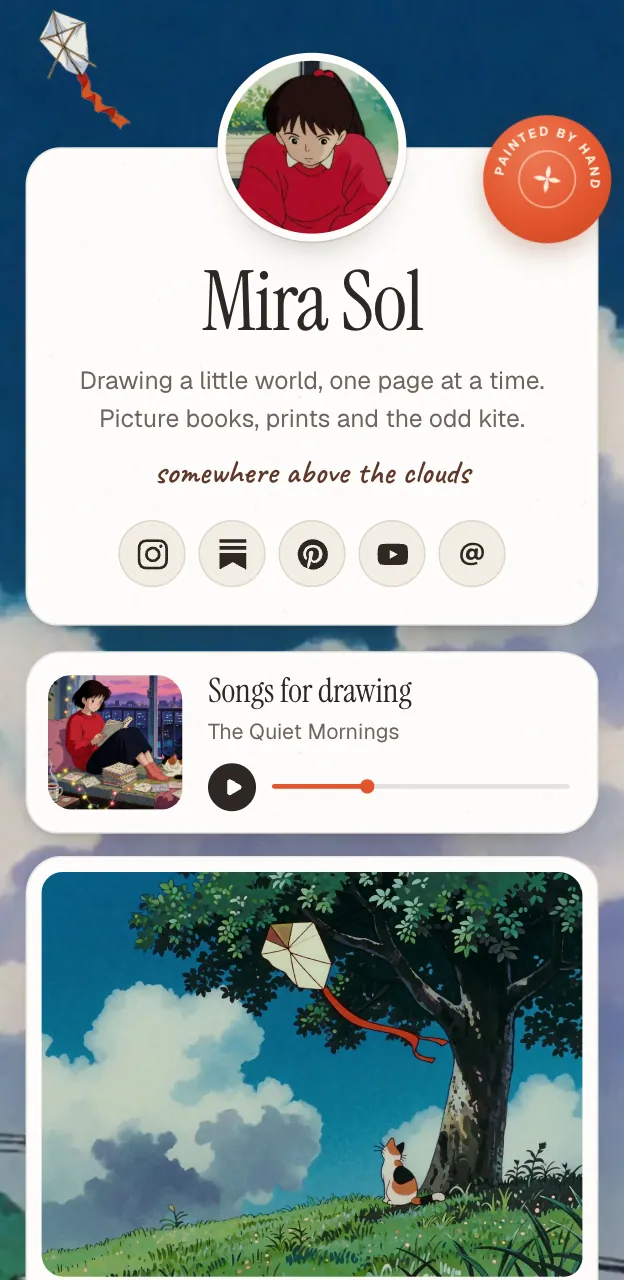
A few specifics:
- Free to start. Unlimited links, the Painted, Desk and Lofi looks, every layout and 30 days of stats cost nothing.
- Pro is $5 a month or $48 a year. It adds your own domain, the Washi, Cobalt and Night looks, a year of stats with CSV export, and removes the small "Made with Posy" link.
- Open source. It is MIT licensed. You can run the whole app on your own server, and every look is unlocked when you do. See how to self-host it.
- It takes your page with you. A page is one JSON file you can download from Settings.
- Your AI can edit it. A hosted MCP server lets Claude, ChatGPT or Cursor build and update the page. More on that in this walkthrough.
Pick it when the look and ownership matter to you, or you want your AI to do the upkeep.
Look elsewhere when you need to take payments, schedule links or run marketing campaigns. Posy has no checkout and does not try to be a business suite.

#A quick way to choose
| If you mainly want to... | Look at |
|---|---|
| Share links on a page with personality | Posy |
| Use the best-known tool with business features | Linktree |
| Sell digital products from one login | Beacons |
| Get a plain page live fast | Bio.link |
| Design a small site yourself | Carrd |
| Take payments for courses or bookings | Stan |
#What to check before you switch
Whichever tool you land on, a few checks save you from regret.
Test it on your phone. Most people open your link on a phone, from inside another app. Look at the page there, not in your editor.
Check the exit. Can you take your page and your links with you? If leaving is hard, you are renting, not owning.
Check what the free plan hides. Custom domains, analytics depth and branding are the usual things that move to paid plans. Decide whether you need them, then check whether they cost extra.
Look at the speed. A link page should open instantly. Heavy pages lose people before they see anything.
Keep the old link alive. Do not delete your old page until the new one is live and your bio points at it. Nothing breaks that way.
#Moving over takes minutes
You do not need to export anything. Copy your links from the old page, paste them into the new one, pick a look and publish. In Posy, each pasted link becomes the right kind of tile: a GitHub repo shows its stars, a Spotify album becomes a music card with its cover, a YouTube link becomes a video that loads only when played.
Then change the link in your bio. Your old page keeps working until you do.
#My honest advice
If you sell, choose for the checkout. If you share, choose for how it looks and who owns it. Most people who read a post like this do not need a business suite. They need a good page that is easy to keep up, and almost any tool on this list can give them one.
If you want the one that looks hand-made, make your page, or try the looks first and see which one feels like you.