posy
posy


Your GitHub profile already shows everything you have done. A link in bio is a different job. It is the one address you put in a conference slide, an email signature or a social profile, and it has about five seconds to answer a single question: who is this person and why should I care?
For a developer, that means resisting the urge to link to everything. Here is what I would put on the page, what I would leave off, and how to keep it up to date without it becoming a chore.
#Start with what you want to happen
Before adding anything, decide what the page is for. For developers it is usually one of these.
- Get hired. You want recruiters and hiring managers to see your best work and contact you.
- Get contributors or users. You maintain something and want people to try it or help.
- Get readers. You write, and want people to find the writing.
- Get clients. You freelance or consult.
Pick one as the main thing. Everything else supports it. A page with four competing goals reads as a page with none.
#The short list of what to include
#Two or three repos, not twenty
The tile that suits developers best is the GitHub tile. In Posy you give it owner/name and it shows the description, the main language and the live star count. Posy caches the data and refreshes it daily, so page views never hit GitHub and you never update numbers by hand.
Pick the repos that say something about you: the one people actually use, the one that shows how you think, and maybe a recent one that shows what you are into now. Make the most important one a wide tile so it leads.
#One thing you wrote
If you write, link to your best post rather than your whole archive. Dev.to, Hashnode, Medium and Substack all have ready-made tiles. Add a short note on why it is worth a click, in the form of one sentence about what the reader will learn.
If you do not write, skip this. An empty "Blog" link is worse than none.
#How to reach you
Make contact obvious. An email tile is the simplest, and a LinkedIn tile helps if you are job hunting. Add X, Bluesky or Mastodon only if you actually post there. Posy has social tiles for 29 platforms, including GitHub, Peerlist and Product Hunt, but fewer is better.
#A note on what you want next
A short note tile at the top does a surprising amount of work.
- "Looking for a senior backend role. Rust, Go, Postgres. Remote in EU time zones."
- "Maintaining a small parser library. Contributors very welcome."
- "Freelance slots open from January."
It tells a visitor what to do next, and it takes ten seconds to change when your situation does.
#What to leave out
- Your whole repo list. That is what GitHub is for.
- Every social account. Link the ones you use.
- Skill bars and badge walls. They say little and take space.
- A long bio. Two lines is enough. Link to your site for the rest.
- Links that go stale. A dead project link hurts you. If you cannot keep it fresh, remove it.
#Pick a look that suits you
Developers tend to like a page that feels like their own tools. In Posy two looks fit well.
Lofi is free and feels like a little desktop left open. Every tile is a window and visitors can drag them around. It is playful, and people tend to stay longer on it.
Night is a netrunner's heads-up display, with cut-corner panels, scanned photos and one signal colour. It comes with Pro.

If you want something calmer, Painted is free and quiet, and the list layout turns the page into a single column of links, close to a README.
#Keep it up to date from your terminal
A page you never update decays. The way to keep it fresh is to make updating it as cheap as a commit.
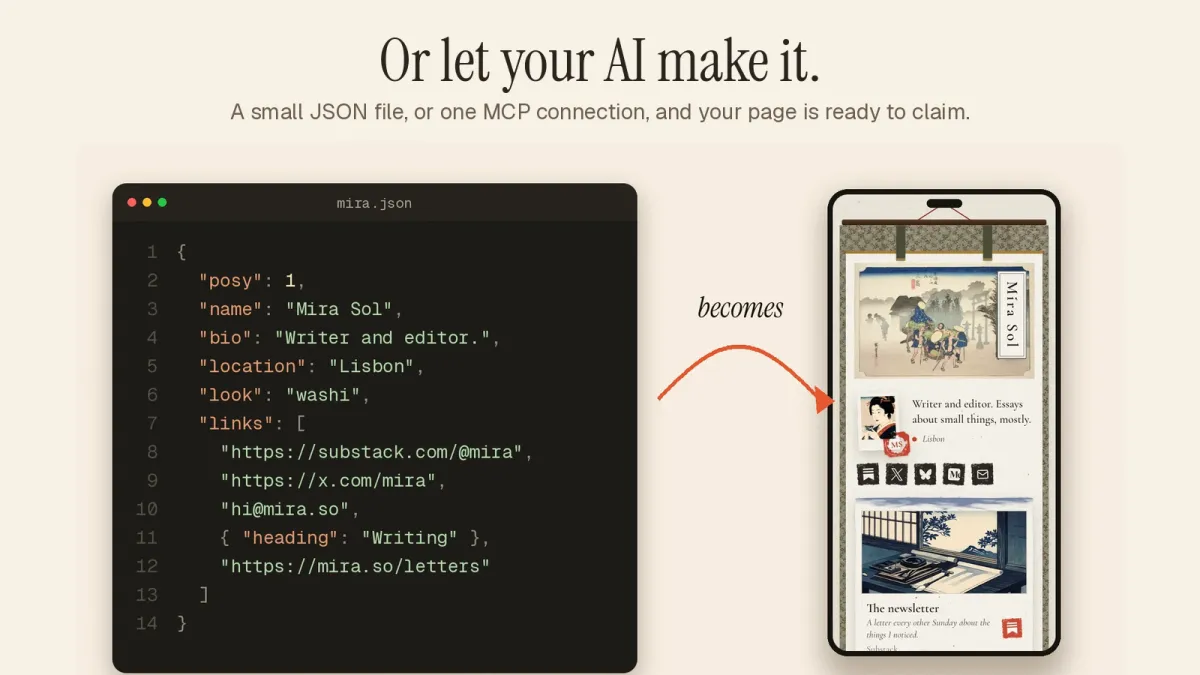
A Posy page is one JSON file with a public schema, and there are three ways to change it without a browser.
The CLI works with a key from the Agents page in your dashboard.
export POSY_URL=https://posy.page POSY_API_KEY=posy_...
npm run posy -- add https://github.com/owner/repo --size w
npm run posy -- publish
The REST API lives under /api/v1/page. The OpenAPI spec is at /openapi.json, so you can generate a client.
MCP lets an AI app edit the page for you. You connect Claude, ChatGPT or Cursor once and then say "add my new repo as a wide tile and publish". I wrote a full walkthrough, and there is a short page on it.
Edits made through the API and MCP land in your draft, and they are version-checked, so you and a script can work at the same time without overwriting each other. Nothing goes live until you publish.
#Own your page
Developers tend to care where their data lives. Posy is open source under the MIT licence, so you can run it yourself on Docker, Vercel or any Node host, with every look unlocked. The page is one JSON file you can download from Settings.
That also means your link-in-bio page can sit on a domain you control. On posy.page that is a Pro feature, and self-hosted it is just DNS. The self-hosting guide covers both.
#A starting layout
If you want something to copy, here is a layout that works for most developers.
- A note tile at the top with what you want next.
- A large GitHub tile for your main project.
- A wide link tile for your best post.
- Two small GitHub tiles for supporting projects.
- A row of small social tiles: GitHub, LinkedIn and one place you post.
- An email tile.
Eight tiles at most. It fits on a phone screen without a long scroll.
#One last check
Open the page on your phone and ask a stranger's question: in five seconds, do I know who this is and what to do next? If yes, you are done. If not, delete something.