posy
posy


Yes, ChatGPT can make a website for you: it will write the HTML, CSS and JavaScript for a complete page in one reply. What it cannot do on its own is put that page on the internet. You still need hosting, an address and a way to update it, and that is where most people get stuck.
This guide is honest about both halves. It covers what ChatGPT does well, where it stops, and two ways to skip the hosting problem for a personal page or link in bio: a link ChatGPT can write that opens a live preview with no login, and a connector that lets it edit a real page. I make Posy, the tool both shortcuts use, so I will also say when it is the wrong choice.
#What ChatGPT does well
Ask for "a one-page website for my bakery" and you get a working file. It is good at:
- Writing the code. Layout, styles, a contact section, even small scripts.
- Writing the words. Headlines, an about section, short descriptions for each link.
- Explaining the code. Ask why something is there and it tells you.
- Previewing. In ChatGPT's canvas you can often see the HTML rendered as you go.
For learning, prototypes and throwaway pages, that is plenty.
#Where it stops
The limits are practical, not about the quality of the code.
- It does not host anything. The page lives in the chat until you copy it somewhere that serves files, such as GitHub Pages, Netlify or your own server.
- Updates mean starting again. Next month, when you want to add a link, you paste the file back in, ask for the change, copy it out and upload it again.
- It cannot see your real accounts. It guesses at your profile URLs unless you give them, and it will happily invent ones that do not exist.
- Mobile is on you. Generated pages usually work on a phone, but nobody checks unless you do.
None of this matters for a single afternoon project. It matters a lot for a page you put in your Instagram bio and need to keep current.
#The shortcut: ask for a link, not a file
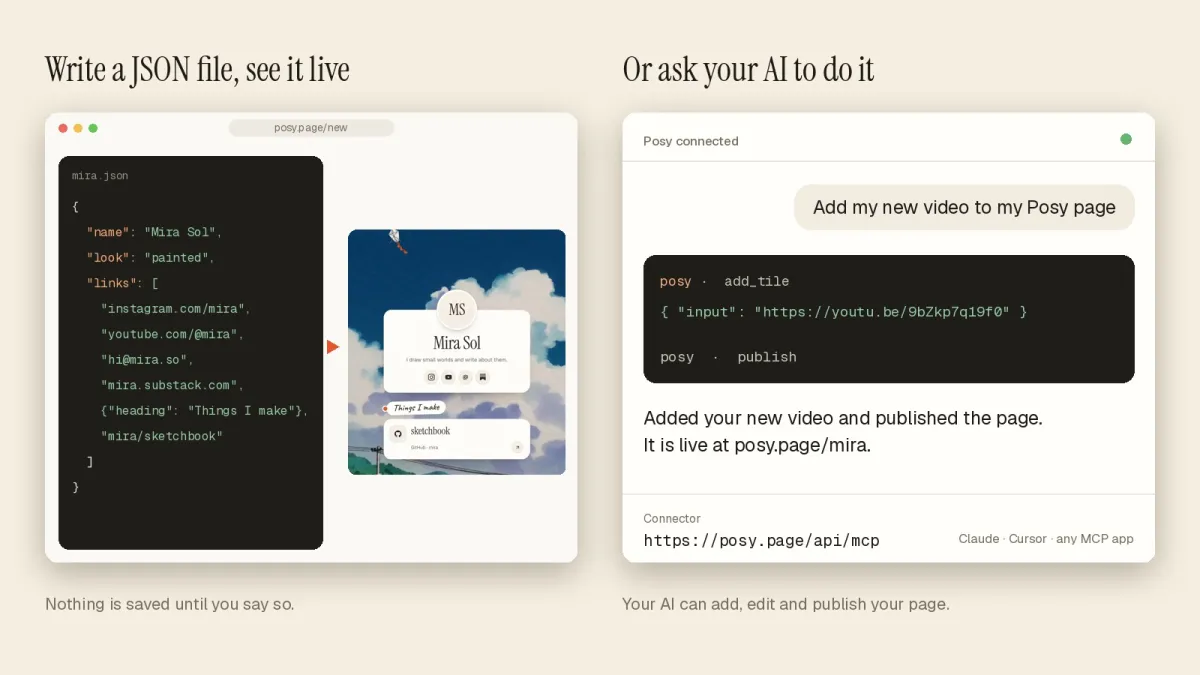
Posy accepts a whole page as a normal web address. Any chatbot can write it, because it is just text, and opening it shows a live preview of the page. You do not need an account to see it. If you like it, one button makes it yours.
The address looks like this:
https://posy.page/new?name=Mira%20Sol&bio=Illustrator&links=https://github.com/mira,hi@mira.so,mira/atlas
The fields are name, bio and links (comma-separated URLs, emails or owner/repo), plus options such as look, theme, layout and font. Posy turns each link into the right tile: a YouTube link becomes a video, a Spotify album becomes a music card with its cover, a GitHub repo shows its stars.
Step by step, on your phone:
- Paste one of the prompts below into ChatGPT, with your own details.
- Tap the link it gives you. Your page opens as a preview.
- Check it looks right, then tap the button to keep it and pick a username.
- Put
posy.page/yournamein your bio.
#The connector route: let it edit a real page
The link is a one-time thing. For ongoing changes, ChatGPT and Claude can connect to Posy over MCP, the Model Context Protocol, and edit your actual page: add a tile, change the look, publish.
In ChatGPT, open Settings, then Apps and Connectors, then Advanced, and turn on developer mode. Create an app with the address https://posy.page/api/mcp, choose OAuth and sign in to Posy. In Claude, add a custom connector with the same address. The full steps for every app are in the connect guide, and this walkthrough covers what the AI can and cannot do.
Everything the AI changes goes to your draft. Nothing goes live until you publish, or ask it to.
#Five prompts you can copy
Replace the details in brackets.
1. A first page, no account
Make me a Posy page link. Use https://posy.page/new with the query fields name, bio and links (comma-separated). My name is [Asha Rao], bio "[Ceramics in Pune]", links: [instagram.com/asharao, etsy.com/shop/asharao, asha@example.com]. URL-encode it and give me only the link.
2. Pick a look for me
Same as before, but add look=lofi and choose a theme that suits a musician. Explain your choice in one line, then give the link.
3. A developer page
Build a Posy /new link for a developer. Name [Dev Patel], bio "[Backend engineer, writes about Postgres]". Links: [github.com/devpatel, devpatel/pgtools, devpatel.dev/blog]. Use look=cobalt.
4. With the connector on
Using the Posy connector, read my page, then add my new video [youtube link] as a large tile at the top. Do not publish yet.
5. Weekly upkeep
Using Posy, change my note to say commissions open on [1 November], move my shop link to the top, and publish.
The first three work in any chatbot, including ChatGPT without a login. The last two need the connector.
#Which route should you pick?
| You want | Best route | You need |
|---|---|---|
| A custom site you will host yourself | Ask ChatGPT for HTML | Hosting and a little setup |
| A personal page live in two minutes | The /new link |
Nothing until you keep it |
| A page your AI keeps up to date | The MCP connector | A free Posy account |
| A shop or booking site | A site builder with checkout | A paid plan, usually |
#Where Posy is not the right pick
- You need a full website. Posy makes a link-in-bio page, one page with tiles. If you need several pages, a blog or forms, ask ChatGPT for the code and host it, or use a site builder like Carrd.
- You sell from the page. Posy has no checkout.
- You want to own every line of HTML. A Posy page is drawn by a look you pick, not written by hand. If you want your own markup, use the generated file.
#FAQ
#Can ChatGPT make a website for free?
ChatGPT can write the code on its free plan. Hosting is separate. GitHub Pages and similar services host static files for free, and a Posy page made from a /new link is free to keep.
#Can ChatGPT build a website without me logging in anywhere?
It can write a Posy /new link, and you can open the preview without an account. You only sign up when you want to keep the page at your own address.
#Can ChatGPT publish a website for me?
Not by itself. With a connector such as Posy's MCP server, it can publish your page when you ask, because the connector does the publishing.
#Is the code ChatGPT writes any good?
For a simple page, usually yes. Check it on a phone, check every link, and do not paste in anything secret.
#What is the difference between this and an AI website builder?
An AI website builder generates a site inside its own editor. The routes here let a general chatbot you already use write or edit the page. See AI link in bio for more on that.