posy
posy


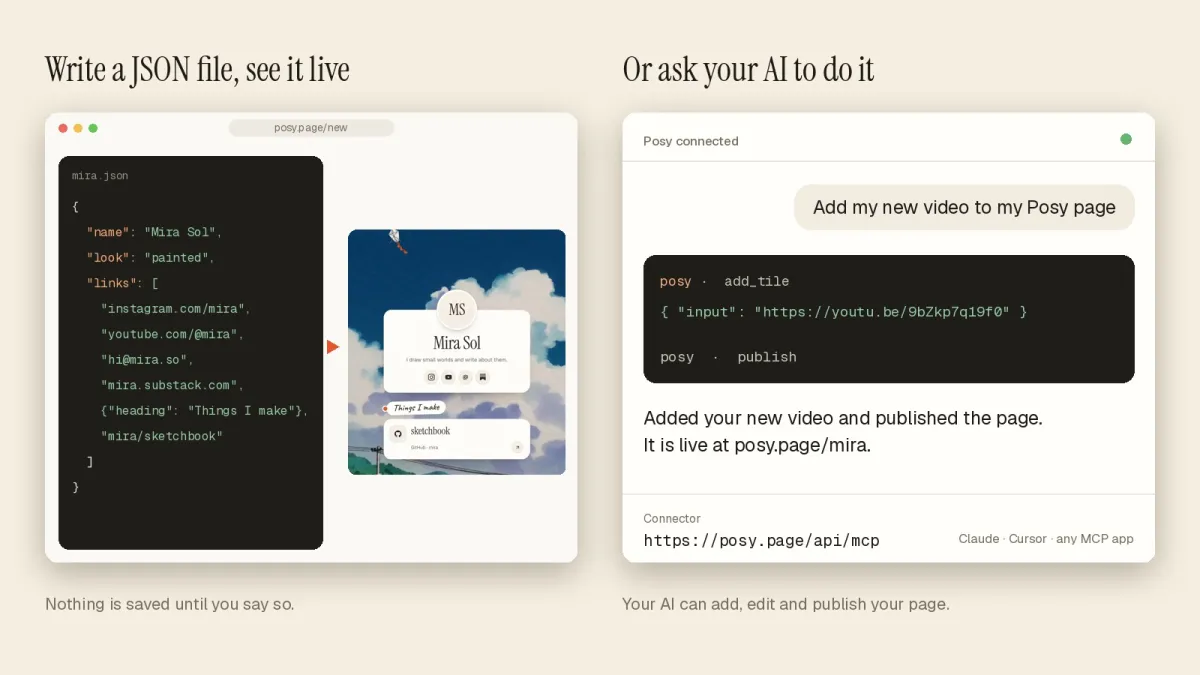
A remote MCP server is an HTTP endpoint that AI apps connect to over the network, sign in to with OAuth, and call tools on. Posy's runs at https://posy.page/api/mcp: one Next.js route using Streamable HTTP, OAuth 2.1 with dynamic client registration through Better Auth, and 11 tools that edit a link-in-bio page.
This is a write-up of how it is built, with the real code (shortened), because most MCP examples are local stdio servers and stop before the parts that are hard in production: auth, tool design and keeping several interfaces in sync. Posy is MIT licensed, so you can read the whole thing in the repo.
#The shape of the system
| Piece | What it does | Where it lives |
|---|---|---|
| MCP endpoint | Streamable HTTP, tool calls | src/app/api/mcp/route.ts |
| Authorization server | OAuth, DCR, consent, JWTs | Better Auth under /api/auth |
| Protected resource metadata | Tells clients who issues tokens (RFC 9728) | /.well-known/oauth-protected-resource |
| Server metadata | OAuth discovery (RFC 8414) | /.well-known/oauth-authorization-server |
| Page operations | The actual edits, shared with the REST API | src/lib/page-ops.ts |
The important design choice is the last row. The MCP tools and the REST API call the same functions, so there is one place where an edit can go wrong.
#Transport: one route, Streamable HTTP
Streamable HTTP is the MCP transport for remote servers: the client POSTs JSON-RPC to one URL and the server answers with JSON or a stream. Posy uses Vercel's mcp-handler package, which wraps the official SDK and turns a tool registry into a route handler.
const handler = createMcpHandler(server => {
  server.registerTool('get_page', { title: 'Get page', inputSchema: z.object({}), annotations: READ },
    run(async userId => getState(userId)));
  // ... 10 more tools
}, { serverInfo: SERVER_INFO, instructions: INSTRUCTIONS });
The instructions string is worth more than it looks. It tells the model the flow ("call get_page first, then add tiles, then publish") and the house rules ("ask before deleting things the user added"). Clients show it to the model at connect time, so the model does not have to discover the workflow by trial and error.
#Auth: two kinds of bearer on one endpoint
The route accepts two tokens. API keys (posy_...) are for scripts. OAuth access tokens (JWTs) are for apps like Claude, ChatGPT and Cursor.
const verify = async (_req: Request, token?: string) => {
  if (token?.startsWith('posy_')) return verifyApiKey(token);
  const jwks = createLocalJWKSet(await auth.api.getJwks());
  const { payload } = await jwtVerify(token!, jwks, { issuer: baseURL, audience: RESOURCE() });
  return { token, scopes: String(payload.scope).split(' '), extra: { userId: payload.sub } };
};
export const POST = withMcpAuth(handler, verify, { required: true, requiredScopes: ['page:write'] });
Two details matter. The JWT is checked against the audience https://posy.page/api/mcp, so a token minted for some other resource is refused. And withMcpAuth answers unauthenticated requests with a 401 that points at the protected resource metadata, which is how a client finds the authorization server in the first place.
#OAuth and dynamic client registration
An MCP client connecting for the first time has no client ID. Dynamic client registration (RFC 7591) lets it register itself, then run a normal authorization code flow with PKCE. Better Auth's mcp plugin does all of this.
mcp({
  loginPage: '/login',
  consentPage: '/oauth/consent',
  resource: `${siteUrl()}/api/mcp`,
  scopes: ['openid', 'profile', 'email', 'offline_access', 'page:write'],
  allowDynamicClientRegistration: true,
  allowUnauthenticatedClientRegistration: true,
  grantTypes: ['authorization_code', 'refresh_token'],
}),
The user's experience is: click connect in Claude, land on the normal Posy login, see a consent screen naming the app, and go back. offline_access gives the client a refresh token so the connection survives past the access token's expiry.
Posy also enables client ID metadata documents (the cimd plugin), where a client's ID is a URL that hosts its own metadata, so no registration call is needed at all. Supporting both means older and newer clients both connect.
The two .well-known routes are a few lines each. The protected resource one is the whole of RFC 9728 for this server:
export async function GET(req: Request) {
  const { baseURL } = await auth.$context;
  return protectedResourceHandler({ authServerUrls: [baseURL], resourceUrl: `${siteUrl()}/api/mcp` })(req);
}
#Tool design: 11 tools, shaped like the editor
The tools are get_page, create_page, import_page, add_tile, update_tile, remove_tile, move_tile, set_theme, set_profile, publish and list_options. A few rules shaped them.
Small and nameable. Each tool maps onto something a person does in the editor. Models pick tools by name and description, and "add_tile" is hard to misuse.
Batch where people batch. People paste a list of links. So add_tile takes inputs, an array of up to 30 strings, and Posy detects what each one is. One call instead of 30 round trips.
Let the model ask instead of guess. list_options returns the allowed looks, palettes, fonts and sizes. Without it, models invent theme names that do not exist.
Return the next step. Responses include a next hint, such as "There are unpublished changes. Call publish when the user is happy." It keeps long conversations on track.
Errors as content. A failed call returns isError: true with a readable message, so the model can recover rather than stall.
#Annotations: read-only, destructive, idempotent
MCP tool annotations are hints clients use to decide when to ask the user for confirmation. Posy defines five sets and gives every tool one.
const READ    = { readOnlyHint: true,  destructiveHint: false, idempotentHint: true,  openWorldHint: false };
const WRITE   = { readOnlyHint: false, destructiveHint: false, idempotentHint: false, openWorldHint: false };
const SET     = { readOnlyHint: false, destructiveHint: false, idempotentHint: true,  openWorldHint: false };
const DESTROY = { readOnlyHint: false, destructiveHint: true,  idempotentHint: true,  openWorldHint: false };
const PUBLISH = { readOnlyHint: false, destructiveHint: false, idempotentHint: true,  openWorldHint: true };
get_page and list_options are READ. add_tile is WRITE because calling it twice adds two tiles. set_theme is SET because setting the same theme twice changes nothing. remove_tile and import_page (with replace) are destructive. publish is the interesting one: it only touches the user's own page, but it makes content public, so it is marked open-world.
The other safety net is the draft. Every tool edits the draft, and edits are version-checked, so an AI and a person editing at once cannot silently overwrite each other.

#One zod schema, three interfaces
The page format is a zod schema in src/lib/schema.ts. Everything else derives from it.
- JSON Schema. The CLI writes
z.toJSONSchema(Page)to/schema/page.schema.json, and the brief format is served the same way from/schema/brief.schema.json. - OpenAPI. The REST description at
/openapi.jsonreferences that JSON Schema for the page body, so the API docs and the file format cannot drift. - MCP inputs. Tool input schemas reuse the same enums (
SIZES,FONTS,LAYOUTS,STYLE_IDS), so a look that does not exist is rejected by the schema before any code runs.
const schema = { $id: `${siteUrl()}/schema/brief.schema.json`, ...z.toJSONSchema(Brief, { io: 'input' }) };
Add a look, and the MCP input, the JSON Schema and the API docs all pick it up on the next build.
#Publishing to the MCP registry
A server.json in the repo describes the server for the official MCP registry: name io.github.Himanshu-Sangshetti/posy, one remote of type streamable-http. A GitHub Action runs mcp-publisher on each release and logs in with GitHub OIDC, so no secret is stored.
#Where Posy is not the right reference
- You need a stdio server. Posy is remote only. Local servers have a simpler auth story.
- You are not on Next.js or Better Auth. The ideas carry over, but the snippets will not.
- You need fine-grained scopes. Posy has one write scope,
page:write, because a user only has one page. A multi-resource product needs more.
#FAQ
#What is a remote MCP server?
An MCP server reached over HTTP instead of run as a local process. Clients connect with a URL, authenticate with OAuth and call its tools over Streamable HTTP.
#Do I need dynamic client registration?
If you want any MCP client to connect without you creating a client ID for it first, yes, or client ID metadata documents. Posy supports both.
#How do clients find the authorization server?
The 401 response points to /.well-known/oauth-protected-resource, which names the authorization server. The client then reads its metadata and registers.
#Can I try Posy's server?
Yes. Add https://posy.page/api/mcp as a connector in Claude, ChatGPT, Cursor or VS Code. The connect guide and tool reference have the details, and link in bio for developers shows it in a workflow.