 posy
posyLook 6 of 6
Night: your links on a heads-up display.
- Pro on posy.page
- Free when self-hosted
- Netrunner
- Ice
- Redline
- Daylight
A netrunner's heads-up display. Your photos come through a scanner and your links are panels on the net, in one signal colour.
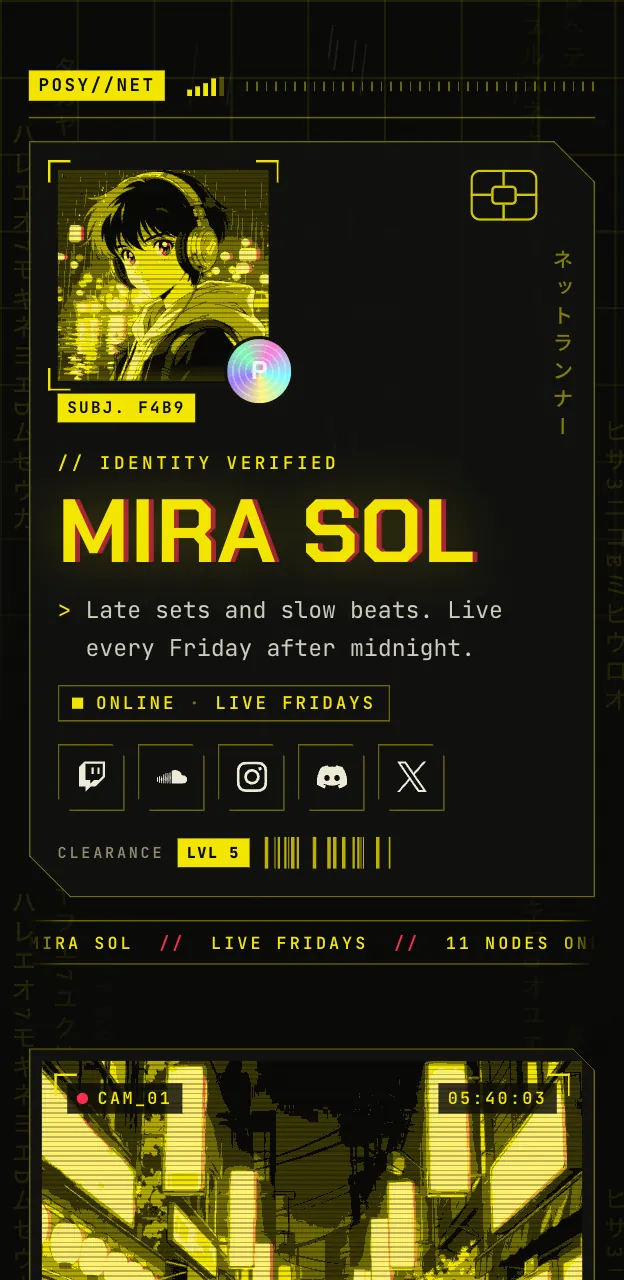

A screen after dark
Night is the sharpest look. Dark panels with cut corners, text in a technical face, photos that arrive as if scanned, and one signal colour that does all the talking.
The palettes are Netrunner, Ice, Redline and Daylight, so you can change the signal colour and the mood.
Who it suits
Streamers and gamers
It looks like part of an overlay.
Developers and security people
It looks like a terminal that went to design school.
Producers and DJs
A dark page that makes the cover art pop.

Night or something else?
Choose Night
You want dark and sharpOne colour, hard edges.
Try Lofi
You want it freeA friendlier desktop with draggable windows. See Lofi.
Try Cobalt
You want dark but editorialPick the Moonlit palette. See Cobalt.
Tips for a Night page
Choose one signal colour
The page runs on a single bright colour. Pick an accent that stands out against dark panels, and use it everywhere.
Write short link titles
Panels are compact. A title such as "Latest VOD" fits, and a full sentence does not.
Use good source photos
Photos come through a scanner effect, so start with sharp, well-lit pictures and let the look add the grain.
Add a note for status
A one-line note such as "Live Fridays 8pm UTC" reads like a system message and suits the look.
Make a Night page
Make your page first
Add your links in any free look so everything is in place.
Upgrade to Pro
Night comes with Pro.
Switch to Night
Choose it in the editor. Your tiles become panels.
Set the signal colour and publish
Pick a palette, set your accent, and publish.
Questions
Is Night free?
Night is part of Pro on posy.page, which is $5 a month or $48 a year. Self-hosted, every look is unlocked.
What are the palettes?
Netrunner, Ice, Redline and Daylight. Try each and keep the one that reads best for you.
Can I pick any colour as the signal colour?
Yes. Set any accent colour in the theme settings.